ip
Spike User Guide
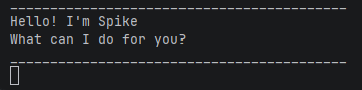
Spike is a command-line task manager chatbot that helps you track tasks quickly and efficiently using simple text commands.
Spike supports the following task types:
- Todo tasks
- Deadline tasks
- Event tasks
- Finding tasks using keywords
Spike runs in the terminal and stores tasks locally so they persist between runs.
Quick Navigation
Features
📝 Note: Words in
UPPER_CASEare parameters to be supplied by the user.
e.g. intodo DESCRIPTION,DESCRIPTIONis a parameter, such astodo read book.
Viewing all tasks : list
Shows all tasks currently in the list.
Format: list
Example:
list
Expected output:
Here are the tasks in your list:
1.[T][ ] read book
2.[D][ ] submit assignment (by: Friday)
Adding a todo task : todo
Adds a simple task with no date.
Format: todo DESCRIPTION
Example:
todo read book
Expected output:
Got it. I've added this task:
  [T][ ] read book
Now you have 1 tasks in the list.
Adding a deadline : deadline
Adds a task with a deadline.
Format: deadline DESCRIPTION /by TIME
Example:
deadline submit report /by Friday
Expected output:
Got it. I've added this task:
  [D][ ] submit report (by: Friday)
Now you have 2 tasks in the list.
Adding an event : event
Adds a task that occurs during a time range.
Format: event DESCRIPTION /from START /to END
Example:
event meeting /from 2pm /to 4pm
Expected output:
Got it. I've added this task:
  [E][ ] meeting (from: 2pm to: 4pm)
Now you have 3 tasks in the list.
Marking a task as done : mark
Marks a task as completed.
Format: mark TASK_NUMBER
💡 Tip: Use
listfirst to check the task numbers before marking.
Example:
mark 1
Expected output:
Nice! I've marked this task as done:
  [T][X] read book
Unmarking a task : unmark
Marks a completed task as not done.
Format: unmark TASK_NUMBER
Example:
unmark 1
Expected output:
OK, I've marked this task as not done yet:
  [T][ ] read book
Deleting a task : delete
Removes a task from the list permanently.
Format: delete TASK_NUMBER
⚠️ Warning: Deleted tasks cannot be recovered.
Example:
delete 2
Expected output:
Noted. I've removed this task:
  [D][ ] submit report
Now you have 2 tasks in the list.
Finding tasks : find
Searches for tasks containing a keyword.
Format: find KEYWORD
💡 Tip: The search is case-sensitive. Use lowercase to match most tasks.
Example:
find book
Expected output:
Here are the matching tasks in your list:
1.[T][ ] read book
Exiting the program : bye
Exits Spike. Tasks are saved automatically before closing.
Format: bye
Example:
bye
Expected output:
Bye. Hope to see you again soon!
Command Summary
| Command | Format |
|---|---|
list |
list |
todo |
todo DESCRIPTION |
deadline |
deadline DESCRIPTION /by TIME |
event |
event DESCRIPTION /from START /to END |
mark |
mark TASK_NUMBER |
unmark |
unmark TASK_NUMBER |
delete |
delete TASK_NUMBER |
find |
find KEYWORD |
bye |
bye |
Saving
Spike automatically saves your tasks to:
data/spike.txt
Tasks are loaded automatically when the program starts again. You do not need to save manually.